Mudkip Mud Sport

Mudkip's Mud Sport Journal

The theme of late 2025 to 2026 is building small certainties in a reality of uncertainties.

New DIY NAS

As Synology moves away from the consumer market, blocking 3rd party drives (though the decision was reverted) and dropping support for hardware transcoding even when the hardware supports it, I have been planning to build a new NAS using open-source solutions. The global memory crisis since late 2025 reminded me of my spare 32GB of DDR4 SODIMMs, as well as the 56TB of HDDs from my backup NAS.

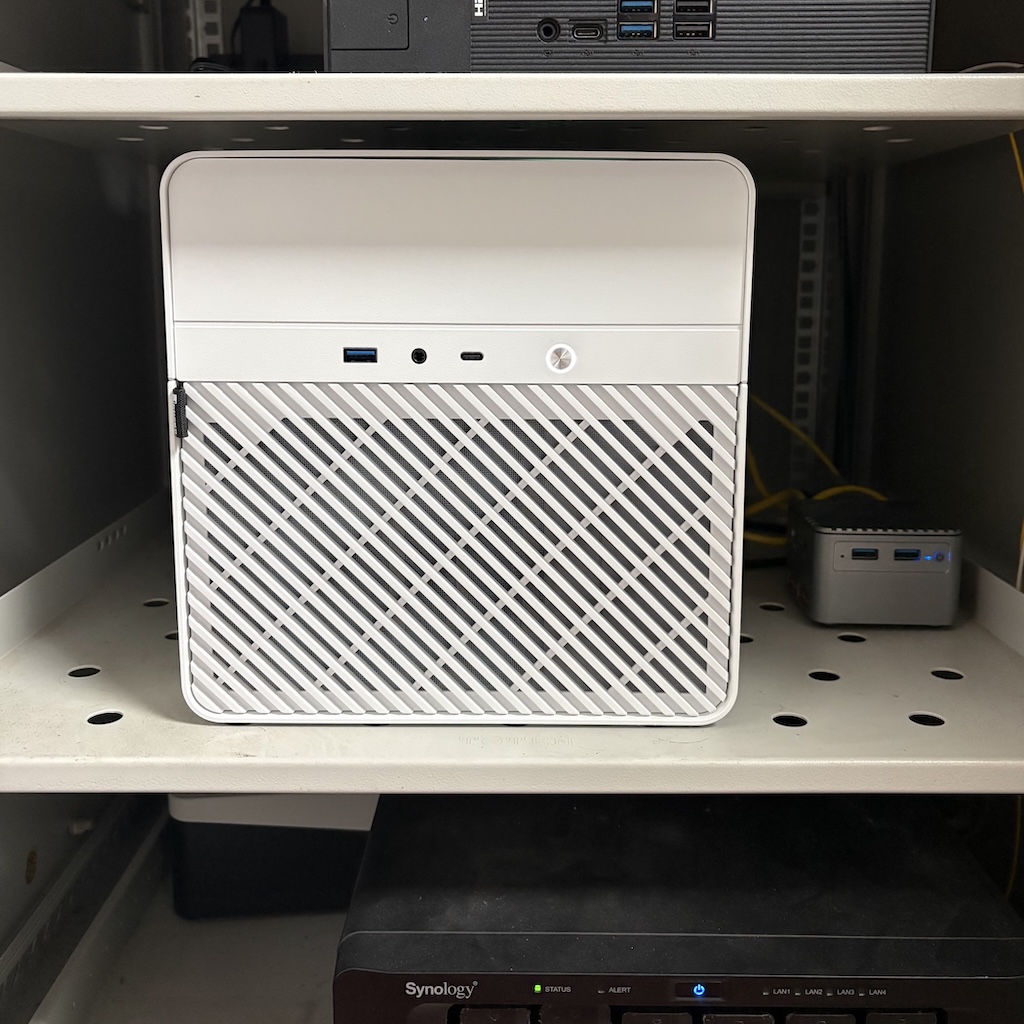
My rule for the new NAS was simple: it must support DDR4 RAM, and ideally support SODIMM and/or dual-channel (since I have two 16GB DDR4 SODIMMs). My initial choice was the Aoostar WTR Pro 5825U, which seemed like a perfect match. However, multiple users were worried about its power constraints. Because it doesn’t support powering up the HDDs sequentially, the boot might fail if all 4 HDDs draw high wattage simultaneously. In the end, I settled on a custom build with a Topton Ryzen 7 5825U Motherboard, a Jonsbo N2 Case, and a Great Wall SFX PSU. I also sold the Synology DS916+ and recouped half of my upgrade expenses.

On the software side, I picked OpenMediaVault 8. The Web UI looks shabby compared to Synology but actually works quite well. Three of my drives were formatted with BTRFS and grouped as a mergerfs pool, the other is used as a parity drive for SnapRAID. The setup operates similarly to RAID5 but feels much easier and safer. Even if two disks develop bad sectors, I would only lose a small amount of data. The only catch is that I can no longer afford a new HDD if any of them die out of warranty due to skyrocketing prices.

Using OMV-Extras, it’s easy to have containers and VMs managed right in the OpenMediaVault Web UI. I’ve also researched and settled on these Synology alternatives:

  • SFTPGo for WebDAV and SFTP access
  • Filebrowser for managing files on the web (though I still miss remote unzipping with Synology File Station)
  • Kopia for backups
  • Aria2 and qBittorrent for downloading Linux ISOs
  • Frigate NVR as a Surveillance Station alternative

I transferred my data using rsync from the DS1621+ and subsequently set up reverse rsync tasks to back up from the new NAS to the DS1621+. I named my new NAS “metagross.lan” for its massive storage size and computing power.

Gaming Devices

I’ve reshuffled my handheld gaming devices again. They are now the Nintendo Switch 2, Steam Deck OLED, and Ayn Thor.

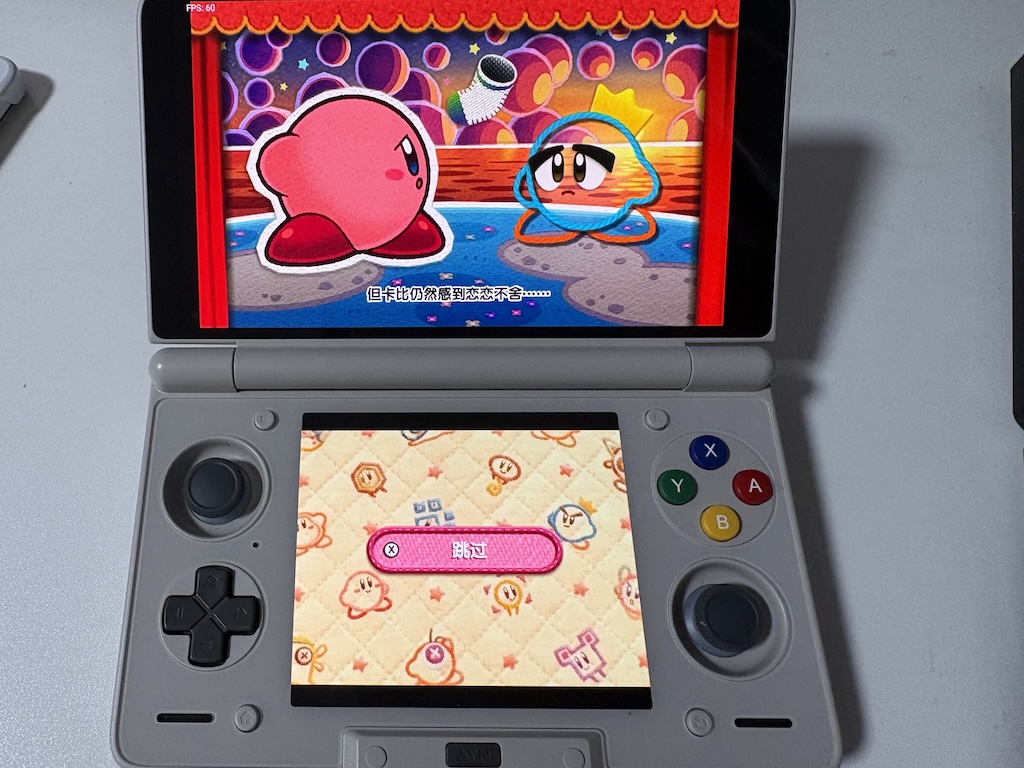
The dual-screen Ayn Thor looks stunning when playing DS and 3DS games with upgraded resolutions and textures. It can emulate every retro system, and many PC games run nicely with GameHub thanks to the development of FEX-Emu. Tinkering with the configurations, emulators, local streaming setups, and front-ends is fun and provides a sense of control.

Sometimes I regret not building a new PC in 2025 when I could still afford RAM and SSDs, but I appreciate my old 12th-Gen Intel build and the new AMD RX 9070 XT GPU every day. Thanks to developments in the Linux kernel, Mesa drivers, GE-Proton, vkd3d, and various other components, gaming performance gets noticeably better every few weeks. For the games I’ve been playing recently, it’s easy to achieve a stable 100+ FPS at 4K maximum settings with FSR 4, even though I capped the GPU at a 70% power limit.

Moe Memos

I finally took the time to finish the major upgrade to Moe Memos that I had been planning for over two years. It started out of frustration: slow loading times when I was away from home, the inability to use my own app when I was offline or having IPv6 connectivity issues, and all the minor headaches of aging code.

The new releases of both the iOS and Android versions can finally work offline and sync flawlessly (at least in my experience), and there are many improvements regarding attachments, Markdown support, widgets, and other minor details. It is once again my primary tool for capturing thoughts, managing to-dos, and even transferring files across devices.

Honestly, it was partly accomplished with the help of LLM agents, but I read and understand every line of code changed, and I have to admit the final product might be slightly better than what I could have written manually.

Thoughts on A and I

I’ve been discreetly trying various LLM tools and models in recent months, including Codex and OpenCode for writing and explaining code, OpenClaw as a personal assistant, and Gemini for regaining my mental health. They all work very well, and I can no longer treat this type of technology as just slop.

However, I feel pessimistic about the macroeconomic effects caused by the development of AI, and I feel angry when I see CEOs expressing excitement over “productivity boosts”. As someone who writes code for a living, the “real work” part of my job is being completely replaced by typing a spell into the terminal and staring at the magic happening. It feels both interesting and vacant. I have a strong feeling that becoming unemployed is more a matter of “when” than “if”, as I know my skills will eventually no longer be needed in this new reality. I also feel scared of a future where we individuals can no longer afford computer components and have to rent resources for everything.

But honestly, somehow I feel the current labor system should come to an end anyway, as it has been deteriorating across the whole planet for multiple decades. People have been working longer hours, doing more bullshit jobs, and corporations have been betraying societal benefit for power and profit, a.k.a. “shareholder value” all along, especially in the tech industry. And when critics point out that LLM training steals knowledge and infringes on copyright, I feel the current copyright system should come to an end too, as it was designed for monopoly and corporate profits instead of creative workers all along.

In the end, I respect AI vegetarians, and there are valid reasons to avoid and reject this type of technology, especially when it is controlled by oligarchs. But the world is moving in a direction where this progress can no longer be decelerated, and it is affecting everyone. The alternative might be guiding it to be controlled by the many. The progress of open weight models, which technically can be run by anyone with enough hardware, such as MiniMax 2.5, Kimi 2.5, GLM 5, and Qwen 3.5, is inspiring, and there might be similar hope for RAM and other hardware.

Trips and Live Concerts

Somehow, over the past few years, anime music events and live concerts had become a weekly normalcy in my city. While I only attended a few, it felt good to be hopeful and always anticipating the next surprise from my favorite seiyuu groups. That all came to an end due to the diplomatic tensions that started in Nov 2025. I went through a kind of despondency but managed to navigate this new reality, and well, with the help of LLMs.

Nevertheless, I attended two BanG Dream! live concerts this January. Poppin’Party New Year LIVE - Happy BanG Year!! in Ariake was so much fun and deeply healing. The setlist was fabulous: Setsunai Sandglass, two versions of Yes! BanG_Dream!, and Drive Your Heart are all favorites of mine. I also enjoyed the pure fun vibe of the live performance, Hego’s sunglasses, Ayasa’s rattle-drum, and all the stage settings were incredibly amusing.

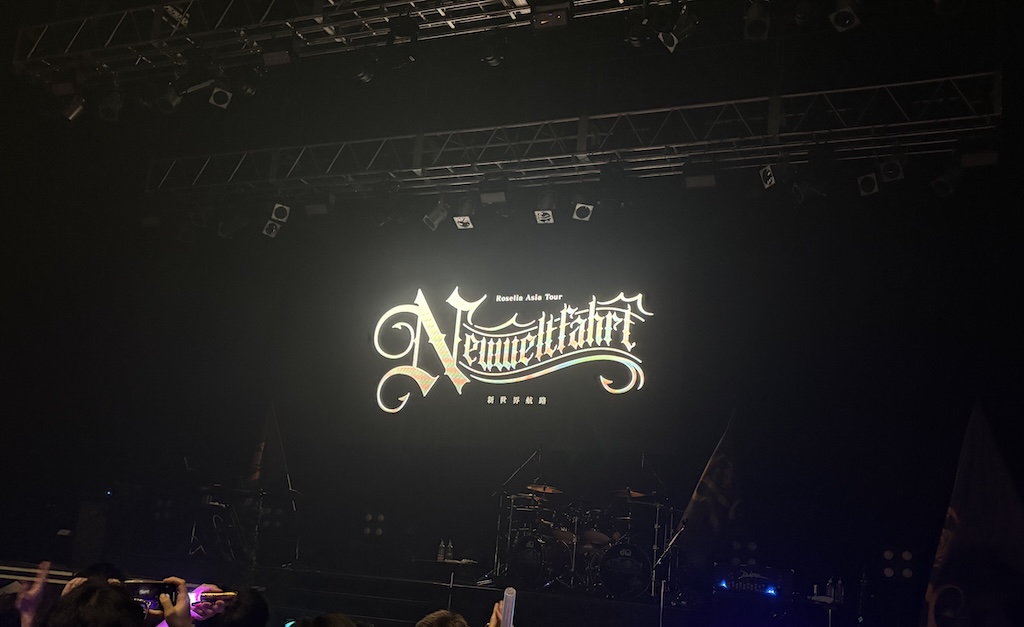
The second was Roselia Asia Tour - Neuweltfahrt at Zepp Osaka Bayside, which was originally planned for my local city. It was a challenging trip, as heavy fog delayed my plane for 5 hours. However, the livehouse experience was beyond exciting. The stage was very close, and the acoustics were fantastic. My tears burst out hearing Ringing Bloom, Hidamari Rhodonite, Kiseki, and Yakusoku. As Kudoharu said, “Please carry the energy for the ones who can’t come”, we shouted loudly: We went all out to win!

During these two speedrun trips, I also watched the movie Love Live! Nijigasaki High School Idol Club Final Chapter Part 2 in a theater, and visited many places where the story of Nijigasaki happens around Odaiba, Ariake and Umeda.

What I learned from these trips, as well as everything that has recently happened on this planet, is actually similar to the story of Final Fantasy VII. The world is filled with “mako poisoning”, but we still have a need to protect our Seventh Heaven, our families, our hobbies, our homelabs, our NAS, and our self-hosted applications. In the end, the lifestream of this planet can be saved. As long as I have the Kakugo覚悟, I can always find my Neuweltfahrt新世界航路.

2025 has been an eventful year, with many developments in both real life and my hobbies.

Home Network

My family moved to a new place this summer, which provided an opportunity to upgrade the network setup once again.

Nowadays, ISP cable modems often also function as routers. Previously, I would ask my ISP to switch the modem to bridge mode and use my own OpenWRT router to connect via PPPoE. In our new home, the WAN connection is provided by the rental agency, and the cable modem is fully managed by the ISP. Neither the rental agency nor the ISP knows how to retrieve the PPPoE password, so they’re unable to switch the modem to bridge mode.

While I could register a new fiber WAN connection, the current speed of 500Mbps down / 40Mbps up is sufficient. Additionally, I still receive a /60 IPv6 pool. The IPv4 network is behind CGNAT (NAT Type B), regardless of whether the router uses DHCP or PPPoE.

The main challenge (and opportunity) is that there’s no network port in our bedroom. To solve this, I had to run an invisible fiber cable between the living room, where my homelab cabinet is located, and the bedroom, where I use my PC and gaming devices. This also gave me the chance to upgrade our intranet to a 10GbE/2.5GbE network.

The network switches I added include a XikeStor SKS3200-8E2X (eight 2.5GbE ports and two 10GbE ports) in my homelab cabinet and a SKS3200-5E2X (five 2.5GbE ports and two 10GbE ports) in the bedroom. I also installed a used Synology E10G18-T1 in the DS1621+, a pair of Sirivision SFP+ transceivers to link the two switches, two XikeStor SFP+ to RJ45 adapters for the DS1621+ and the NUC 12 Extreme PC, and a UGREEN 2.5G USB-C to Ethernet adapter for the iMac. As a result, I now have a 10Gbps connection between the NAS and the NUC 12 Extreme PC, along with 2.5Gbps connections for several other devices.

A week after setting up the intranet, I encountered a strange issue: whenever I transferred files from the NAS to the iMac or wireless devices, the network in our bedroom would freeze, even basic DNS requests would time out. Interestingly, I didn’t experience the same problem when transferring files in the opposite direction or from the NAS to the NUC, which has a 10GbE connection, even though those transfers were about three times faster.

After some research using ChatGPT, I discovered that the issue was caused by a feature called flow control. Fortunately, the XikeStor switches include a web-based admin interface, and the problem was resolved after I disabled flow control on the 10GbE ports.

Devices Reshuffle

The biggest upgrade this year is the NUC 12 Extreme PC. The main issue with this machine was the unbearable noise during midnight gaming sessions. Fortunately, I found a solution from another user with the same NUC model. I replaced the top case fans with three Thermalright TL-B9 units, and now the PC is much quieter.

Another major upgrade was the GPU. I replaced the RTX 3080 with a PowerColor Reaper RX 9070 XT. AFAIK it’s the only modern mid-range GPU that fits inside the NUC 12 Extreme chassis. The RX 9070 XT performs significantly better in newer titles like Clair Obscur: Expedition 33 and Assassin’s Creed Shadows, even when its TDP is limited to 70%. It’s also a relief to be free from NVIDIA-related issues on Linux, thanks to the switch to AMD. That said, I’m still waiting for Mesa 25.2 to enable FSR 4 support.

The display of my Minisforum V3 Tablet stopped working on January, and customer service informed me that they couldn’t repair it since the model is no longer in production. They offered a partial refund, which I found reasonable for a device I had used for nine months.

I also upgraded my Lenovo Legion Y700 (Legion Tab) to the 3rd generation, which features the more powerful Snapdragon 8 Gen 3 chip. Although the 4th generation was released shortly afterward, the nano-textured display on the 3rd gen made the upgrade worthwhile.

Recently, I sold my Steam Deck LCD, Aya Odin 2 Pro, and Anbernic RG35XXSP. In their place, I picked up a Retroid Pocket Flip 2, as well as repurpose the Legion Tab for handheld gaming. The reason behind this shift is that game streaming from my PC to the Legion Tab delivers far better graphics and smoothness than any handheld PC like the Steam Deck. The Retroid Pocket Flip 2 strikes a great balance for retro game emulation and has a better screen than both the Odin 2 and the RG35XXSP. The Legion Tab also works well for DS and 3DS emulation with its vertical layout.

I also connected a spare dummy HDMI plug to the NUC 12 Extreme PC, disabled the automatic display turn-off in KDE settings (while keeping auto-sleep enabled since I can wake the system via WoL), and configured Sunshine to improve game streaming experience.

  • Do commands:

    1
    2
    kscreen-doctor output.HDMI-A-2.enable output.HDMI-A-2.mode.${SUNSHINE_CLIENT_WIDTH}x${SUNSHINE_CLIENT_HEIGHT}@60 output.DP-3.disable
    loginctl unlock-session

    This enables the dummy HDMI output at the correct resolution, disables the primary display, and unlocks the session if it’s locked.

  • Undo command:

    1
    kscreen-doctor output.HDMI-A-2.disable output.DP-3.enable

    This disables the dummy output and re-enables the main display.

Fortunately, I was able to get a Nintendo Switch 2 at a reasonable price (MSRP plus import tax) and received it on the morning of the second day after its release. Since then, the Switch 2 has been my primary gaming device, mainly for Mario Kart World and Donkey Kong Bananza. I’ve also restarted exploring Paldea in Pokémon Scarlet and returned to building my world in Dragon Quest Builders 2.

Homelab

Little has changed in my homelab, though I did downsize it slightly to reduce power consumption. The k3s cluster of 4 VMs has been consolidated into a single-node VM, and the storage solution has been simplified with local-path-provisioner, which consumes no additional power and is easier to backup. Since I now prefer using the NUC 12 Extreme for game streaming, I’ve replaced the Bazzite and Windows VMs on the homelab PC with a Bluefin installation, which runs various AI/ML experiments such as immich-machine-learning, ollama, and InvokeAI.

The object storage on my NAS has been migrated from Minio to Garage, which offers much better performance for small files on the HDD RAID. I’ve also integrated Pocket ID and Tinyauth into some self-hosted apps, making logins easier and more secure. For photo backups, I’ve fully migrated to Immich and no longer rely on Synology’s proprietary apps as Synology is going fully user hostile. However, I use PhotoSync on my iPhone because Immich currently doesn’t play well with iCloud (this issue should be fixed soon).

I also upgraded the cooling system in the homelab cabinet. The previously noisy fan, which was controlled via a smart plug, has been replaced with a Thermalright TL-G12B paired with a PWM controller mounted at the top. As a result, the average idle CPU temperature of the homelab PC dropped from 54°C to 48°C.

52Poké

52Poké migrated to the Hetzner data center in Helsinki in February 2025. This move reduced monthly cloud service costs by 55% while maintaining the same server and storage configurations. It also lowered the risk of relying on a U.S.-based service provider, particularly one entangled in geopolitical tensions, which could pose potential risks for 52Poké as well.

During the migration, 52Poké was upgraded to MediaWiki 1.43, the current LTS release, along with several enhancements, including Math, VisualEditor, audio support via TimedMediaHandler, SVG image support, and native lazy-loading.

In recent years, 52Poké Wiki has experienced increasingly aggressive and indistinguishable bot network crawling, which has led to a lower cache hit rate and occasional website slowdowns. This is likely due to developments in LLMs. For now, we have blocked known AI bots and enabled Cloudflare challenge mode for pages outside the main namespace.

Side Projects

My side projects have been a bit quiet over the past few months, but I’m trying to rediscover the joy and slowly resume work on an experimental project, along with updates for Moe Memos, most importantly, the local storage feature.

It’s been somewhat of a burnout due to the breaking changes in the Memos API, which have required repeated effort and created both urgency and dilemma when updating Moe Memos. Thankfully, I’ve found a workaround to convert the APIs to older versions. Moe Memos may still support the newer Memos API changes directly in future releases, as well as alternative backends, but it will no longer be a source of panic.

Trips and Live Concerts

I visited Tokyo again this June for Aqours Finale LoveLive! Eikyuu Stage Day 2, and also traveled to places like Ikebukuro, Shibuya, and Asakusa.

LoveLive! is a franchise that holds deep meaning in my life. I’ve been a fan of Aqours since nearly the very beginning, almost ten years ago. The story and music of the anime have always inspired me and given me strength. I attended several Aqours live concerts before the pandemic, including the 2nd Live held at the same dome as the Eikyuu Stage. These are truly some of my most cherished memories.

I enjoyed all 24 songs performed on Eikyuu Stage Day 2, every one of them is a favorite of mine. The joyful atmosphere helped ease the bittersweet reality that this was their final live. I especially loved MY Mai☆TONIGHT and WATER BLUE NEW WORLD, though it was a bit unfortunate they weren’t the full version. Hearing HAPPY PARTY TRAIN again and finally experiencing Mitaiken HORIZON live was fantastic. The anime recap during the intermission brought back so many sweet memories.

I cried a lot, and laughed a lot. The Aqours rainbow created by the entire dome during the encore was a huge success. The powerful chorus of Yuuki wa Doko ni? Kimi no Mune ni! was deeply moving. I couldn’t hold back my tears when Anju struck the “stop crying, smile, and thumbs-up” pose on the float.

What’s unique about LoveLive! Sunshine!! is how deeply it connects the beautiful city of Numazu with the fans. For us, Numazu is not only the setting of the anime and the stories of Aqours, it’s also our spiritual hometown. I’ve visited twice and always felt warmly welcomed despite the language barrier. The city isn’t just decorated with franchise elements, the local residents also truly understand the work and are proud of the Aqours members as if they were their own children. We love Numazu not just because of LoveLive!, we love its sky, Mt. Fuji, and the sunshine.

It has been a long journey as a LoveLiver. Just as Rikyako said,
“だから、この先の人生もきっと、私も、みんなも、幸せなことがたくさん待っていると思います.”
I believe in that, too.

This post is inspired by Neil Brown. Being mostly a pessimistic person, I often find myself worrying about the negative impact of technological developments in recent years. However, I’m still trying my best to find joy in the things I care about throughout the year.

Wayland and NVIDIA on Linux Have Improved Massively

2024 has been my year of the Linux desktop. At the start of the year, I still had to rely on numerous workarounds to deal with frustrating issues on my desktop PC caused by NVIDIA’s lackluster Wayland support. However, NVIDIA’s driver improvements throughout the year—especially with explicit sync—along with advancements in Wayland protocols and better fractional scaling support in KDE and now GNOME, have made my Linux desktop experience practically flawless by default.

The Joy of Linux Distributions and Hardware Support

There is so much joy in exploring and learning about recent developments in Linux distributions. My favorite ones—vanilla Fedora KDE, EndeavourOS, and Bazzite—are all quite versatile and stable. With BTRFS snapshots or immutable distros, we no longer need to worry that an upgrade or configuration change will break the system. The mainline Linux kernel is progressing rapidly to keep up with the latest x86 and ARM hardware. Asahi Linux now even offers out-of-the-box Steam support for Apple Silicon Macs.

A Bright Future for Open Handheld PCs

Handheld PCs, pioneered by small manufacturers like GPD and AYANEO, have now become a much larger market thanks to developments like the Steam Deck, ROG Ally, and Legion Go. These devices boast far higher performance than traditional handhelds from Nintendo and Sony, and most importantly, they are mostly open hardware. Users can install any software they want, including alternative operating systems like Bazzite, without needing approval from corporations.

The Blossom of Retro Handheld Consoles and Emulation

Retro handhelds have also seen significant advancements in 2024, transforming what was once a niche market. Anbernic alone released 12 new handheld consoles this year. These devices, which run either Linux-based custom firmware or Android, are primarily used to play retro games from systems like the SNES, GBA, or PlayStation 1. Thanks to the declining cost of smartphone chips, we now have access to high-performance retro handhelds. One of my favorite journeys this year was installing custom firmware on my 3DS after the closure of the Nintendo eShop, backing up my digital purchases and save files, and finishing Poochy & Yoshi’s Woolly World on the Ayn Odin 2 in HD. While Nintendo’s legal actions—or those of fake Nintendo lawyers—may pose challenges, I believe the joy and efforts in game preservation will persist.

Performance Per Watt Continues to Improve

While Moore’s Law is effectively dead, linear advancements in computer performance continue to make life easier. Apple Silicon remains a standout in delivering exceptional performance with low power usage in its M4 series chips, and Snapdragon X is catching up quickly. With Intel’s Lunar Lake platform, high performance per watt is no longer exclusive to ARM. On the GPU side, the next generation of Radeon integrated graphics promises 4060-level gaming performance in new handhelds.

Federated Social Networks Enter the Mainstream

The three major post-Elon social networks—Mastodon, Threads, and Bluesky—are all (at least pretending to for the latter two) embracing a future where social networks are connected via protocols and are no longer controlled by a single company. Personally, I mainly use Mastodon, but I’ve followed accounts from Threads, Misskey, WordPress, and Flipboard via ActivityPub, as well as established bridged connections with Bluesky. I also set up a private GotoSocial instance in a lightweight container and use it with my favorite web app, charmingly named after a Pokémon.

Xiaomi Released an Official Home Assistant Integration

Matter has been disappointing in its failure to deliver on its promise of seamless smart home device integration without vendor lock-ins. However, the open-source Home Assistant has made home automation seamless through community-based integrations and workarounds. I don’t have many smart home devices, but all of mine support either HomeKit or Mi Home. While I’m still using hass-xiaomi-miot, Xiaomi’s official integration eliminates the worry of open support for new devices.

iOS is Opening Up, At Least in the EU

As someone who understands how computers work, I’ve always been frustrated by the dominance of systems where manufacturers, operating system vendors, or authorities control which apps users are allowed to install. In 2024, Apple was forced by the EU’s Digital Markets Act to allow users to install apps from alternative markets or directly from developers. While the notorious notarization process and the ridiculous Core Technology Fee persist, iOS is undeniably more open than ever. A surprising and delightful result of this change is that Apple now allows retro emulators and apps like Delta, making iOS devices more capable than ever.

The Openness and Collaboration in LLMs is Breaking Down Walls

I am acutely aware of the ecological and ethical impact of AI development and usage. However, I am cautiously testing LLMs to explore their capabilities and improve my digital life. I’ve found that open-source (though not technically according to the OSI) models like Llama and Qwen strike a somewhat acceptable balance. Just as blockchain technology once caused GPU prices to skyrocket, we gamers are now caught in the middle again by another GPU-reliant technology. Regulators are also turning AI into another frontline for geopolitical tensions and censorship. Despite this, the underlying architecture of this AI momentum remains largely open, with engineers ceaselessly collaborating on platforms like Hugging Face and GitHub. The breakthroughs in open models like DeepSeek-V3 continue to break down walls of silicon.

LoveLive! Series Asia Tour 2024 in Shanghai

October 6, 2024, is a day I will never forget.

As a LoveLiver for nine years now, LoveLive! Series has been one of the franchises that has had a significant impact on my life. I have many unforgettable memories of both µ’s and Aqours. Although due to the well-known reasonsCOVID and the busyness of real life, I could only watch the recent Aqours Lives, as well as those of Nijigasaki and Liella!, through livestreams, Blu-rays, or online videos, it wasn’t until I saw Liella! at Bilibili World last year and heard about the Asia tour and Aqours Finale this June that I realized once again how incredibly important it is to attend a live concert in person.

LoveLive! Series Asia Tour 2024-Shanghai stage began with a medley of opening songs from the four anime series, and when the three members of µ’s appeared—unchanged from eight years ago—the melody of 僕らは今のなかでBokura no Ima no Naka de began playing, flooding my mind with countless memories. I had to repeatedly reassure myself that this was not a dream but the reality of the moment.

Then came Aqours’ performance. As expected, 恋になりたいAQUARIUMKoi ni Naritai AQUARIUM electrified the entire audience, and Ruby’s コットンキャンディえいえいおー!Cotton Candy Ei-Ei-Oh! was an unexpected delight. I hadn’t listened to Deep Resonance much before, but there’s one line I love: “壊れそうなこんな世界で 出会ったのは偶然じゃないIn this fragile world, our meeting was no coincidence.” Finally, they performed 勇気はどこに?君の胸に!Yūki wa Doko ni? Kimi no Mune ni! which is one of my tied-for-top favorite songs. Every time I feel down, I listen to it, and I nearly cried while singing along this time.

Nijigasaki’s segment featured TOKIMEKI Runners, Just Believe!!!, and three solo songs I’m familiar with. Kasumin was adorable, and Shu-chan might have the best English skills in all of Japan. The crowd roared every time during Eutopia’s Chinese lyrics.

Next was a video from Hasunosora and the group performance of Dream Believers. I felt a little guilty for not following Hasunosora closely, but the overwhelming love the crowd showed them made me realize how much they mean to everyone. I bought three acrylic lottery figures, all of which turned out to be Tsuzuri, so I guess fate is telling me it’s time to catch up.

Liella!’s setlist was filled with songs I’ve been listening to a lot recently. I listened to Guangzhou’s setlist on the way here. Tiny Stars and Starlight Prologue were deeply moving, and all 11 members were adorable. There were plenty of shots of KuuKaa合鲤, which made me very happy.

The climax was µ’s, the most intense part of the night. Even in the back of the arena, the floor was shaking. 僕らのLIVE 君とのLIFEBokura no LIVE Kimi to no LIFE felt like it pulled us back over ten years, and the most exciting moment, of course, was Snow Halation. After eight years, I was once again surrounded by a sea of orange lights. The finale was a group performance of No Brand Girls and Bring the LOVE!, and I lost count of how many times we shouted “hihihi” and “oh yeah.” It wasn’t until I heard “我一直很想见你I’ve always wanted to see you” that I snapped back to reality.

The MC segments awakened memories of classic call-and-responses: GanbaRuby, Yosoro, Ohayoshiko, Sashisuseso, and Fighto da yo, as well as calls I had only ever heard through a screen before, like Kasukasu, “はんばあぐもいいHamburgers are good,” and “素晴らしい声の人Person with a wonderful voice.” For the first time, I shouted them in person. It was also a refreshing experience to have two members fluent in Mandarin. Akina-chan菜宝 also promoted Nijigasaki’s 7th Live and helped translate the members’ comments. When Aya-chan asked, “Has anyone been to the 2016 Fan Meeting?” I screamed out loud. At that moment, I felt so proud, though I’m sure one particular LoveLiverLiyuu backstage must have felt even prouder.

The Asia tour once again reminded me that LoveLive! is みんなで叶える物語A story created together with everyone. The members of Aqours, Nijigasaki, Liella!, and Hasunosora, who have inherited this dream, were once Love Livers themselves. The orange miracle of Snow Halation, the legendary performances of µ’s and Aqours at Tokyo Dome and the Red & White Song Battle, the production of the Nijigasaki anime and movie, and the light show of Guangzhou’s Starlight Prologue were all realized by everyone together, including the fans. The Chinese title of the tour “伴你圆梦,” which may link to that for many LoveLivers outside Japan, the last time they attended a live concert might have been in 2019 or even 2016. This Asia tour itself is the realization of a dream.

Although we often criticize LoveLive!'s management and Bandai Namco, and there are regrets about Aqours Finale, attending this tour made me realize once again how much we all love the LoveLive! Series. Music is such a beautiful thing that breaks down walls壁は (Hi Hi Hi) 壊せるものさ and crosses borders. Next time we meet, it might be at Aqours Finale.

ラブライブ!最高!!いまが最高!

Hardware, Software and Services

An unpopular opinion that my past self would strongly disagree with, and perhaps my future self might too:

The days when we needed to integrate hardware, software, and services are over. Apple has shown that this approach is harmful to consumers and innovation today, and the same holds true for Nintendo. We only need open platform hardware that allows users to run whatever software they want and use whatever services they prefer. While I believe Valve’s monopoly needs to be strongly challenged, Valve’s success with its own games, Steam, and the Steam Deck shows that a company can succeed in all three areas without locking them together. Future Nintendo devices should be open by default, capable of running Linux or Android games without using any exploits, and future Nintendo games should be available on PC. Square Enix’s investment in Playtron shows they understand what’s coming.

Apple makes great hardware and software, and its services—like iCloud with Advanced Data Protection, iMessages with end-to-end encryption, high-quality Apple TV+ shows, and the DRM-free iTunes Music store—are truly exceptional. However, when these are integrated together, they create a monopoly. Apple today relies on “service revenue” to maintain its stock price, but much of this revenue isn’t genuinely about services. Instead, it largely comes from Google paying Apple to sustain their own illegal monopoly, and from the 30% “protection fees” charged on free-to-play games—essentially “casino games for children”—at the cost of undermining the rights and choices of users, developers, and creators. This situation is harmful to our civilization because, by being the only option for installing apps, the App Store becomes a tool for censorship and discrimination.

The Nintendo Switch was a major innovation in 2017. The concept of a small device that can be a portable console, a home console, and a tabletop system for friends to play together was definitely the right direction for gaming consoles. However, by 2024, the Nintendo Switch is underperforming and lagging behind the potential of Nintendo’s own games. Titles like Xenoblade, Pokémon, and Zelda could be significantly better if they can run on modern smartphone hardware, let alone on PCs, instead of on a 20nm processor released in 2015.

Sony announced the PlayStation 5 Pro this week, offering significant graphics upgrades for a dozen games. However, many of these titles can already be upgraded on a modern PC, thanks to Sony’s development of PC ports for PlayStation titles.

Joy-Con and DualSense controllers are fun and it’s fantastic that there are dedicated games that take advantage of their unique designs. However, they should use open standards like Bluetooth or USB and support general devices like PCs and phones. And guess what? They already do.

Today, we have a blooming market of dedicated handheld gaming consoles. If you follow NPC (Next Portable Console), you’ll notice new handhelds being released between every two episodes. These devices run on Linux, Android, or Windows and each supports a game library larger than that of the Nintendo Switch, PlayStation, or Xbox. This trend is just beginning, and we will see even more devices in the future. Eventually, these open systems will collectively become a larger market than traditional locked-down consoles, and no single vendor will be big enough to establish a monopoly.

I believe the future of technology lies in open systems that prioritize user choice, innovation, and competition over monopolistic control. As demonstrated by the evolving market of handheld gaming devices and platforms like Steam, Epic and GOG, there is a growing demand for hardware that supports diverse software ecosystems without restrictive barriers. This shift will empower developers and creators to have more freedom and flexibility and let consumers retake the control over their own devices and contents.

0%